Swytch Laptop Link for Video Conf. in Meeting Room, #952-000009
ANY MEETING, EVERY ROOM
With an innovative design that maximizes compatibility and incorporates DisplayLink®Plug-and-Display technology, Logitech Swytch offers a one-cable laptop link to a room’s conference camera and display, making it easy for teams to meet, present, and stream over any service.
SAY YES TO EASY
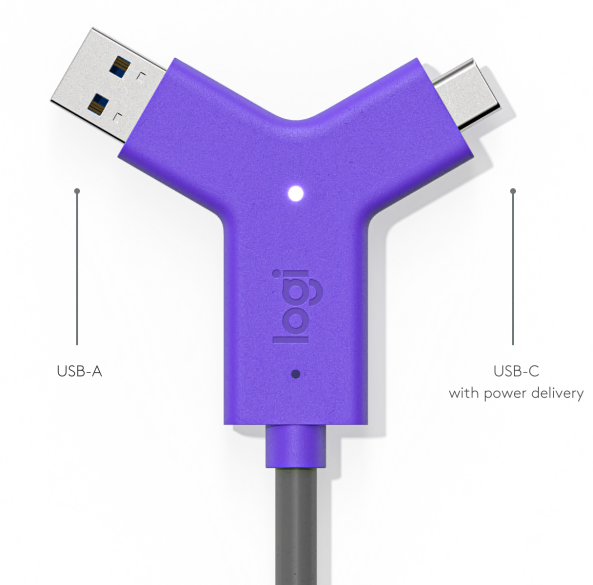
To join or host a video meeting, simply plug the iconic Swytch Connector into any laptop with a USB 3.0 or higher Type A or Type C port. No dongles, no splitters, no HDMI required.
SMART TOPOLOGY
It’s easy to deploy Swytch in rooms with USB conference cameras. Just connect the Swytch Hub to the meeting room equipment and place the Swytch Connector within easy reach.
Medium & Large Rooms
To join or host a video meeting, simply plug the iconic Swytch Connector into any laptop with a USB 3.0 or higher Type A or Type C port. No dongles, no splitters, no HDMI required.
SMART TOPOLOGY
It’s easy to deploy Swytch in rooms with USB conference cameras. Just connect the Swytch Hub to the meeting room equipment and place the Swytch Connector within easy reach.
ADDITIONAL FEATURES
POWER DELIVERY
Never run out of power when hosting a video meeting: Swytch provides 60 watts of power to laptops that charge via USB-C.
PLUG-AND-DISPLAY
Thanks to DisplayLink Plug-and-Display technology, a single connection is all you need for both USB devices and an HDMI display.
FULL MOTION VIDEO + AUDIO
Display movies from a laptop on the room’s display and speakers, and share full-motion video and audio into online meetings.*
WORKS WITH MOST LAPTOPS
Featuring both USB Type A and Type C connectors, Swytch works with Chromebooks and Windows® and Mac® laptops with USB 3.0.
REMOTE MANAGEMENT
Monitor and manage Swytch, MeetUp, Rally, and other meeting room devices with Logitech Sync.
DEPLOYMENT RESOURCES
From wiring diagrams to quick reference cards, a range of deployment resources simplify installation and make it easy to introduce Swytch to end users.